Precision LiDAR timing, managed from your iPhone or iPad

The SplitFast Timing App connects to your wireless LiDAR gates to record sprint times, splits, and race results in real time. Time up to 8 lanes simultaneously, manage multi-athlete distance races, and publish results directly to the SplitFast Results Portal — all from a single app.
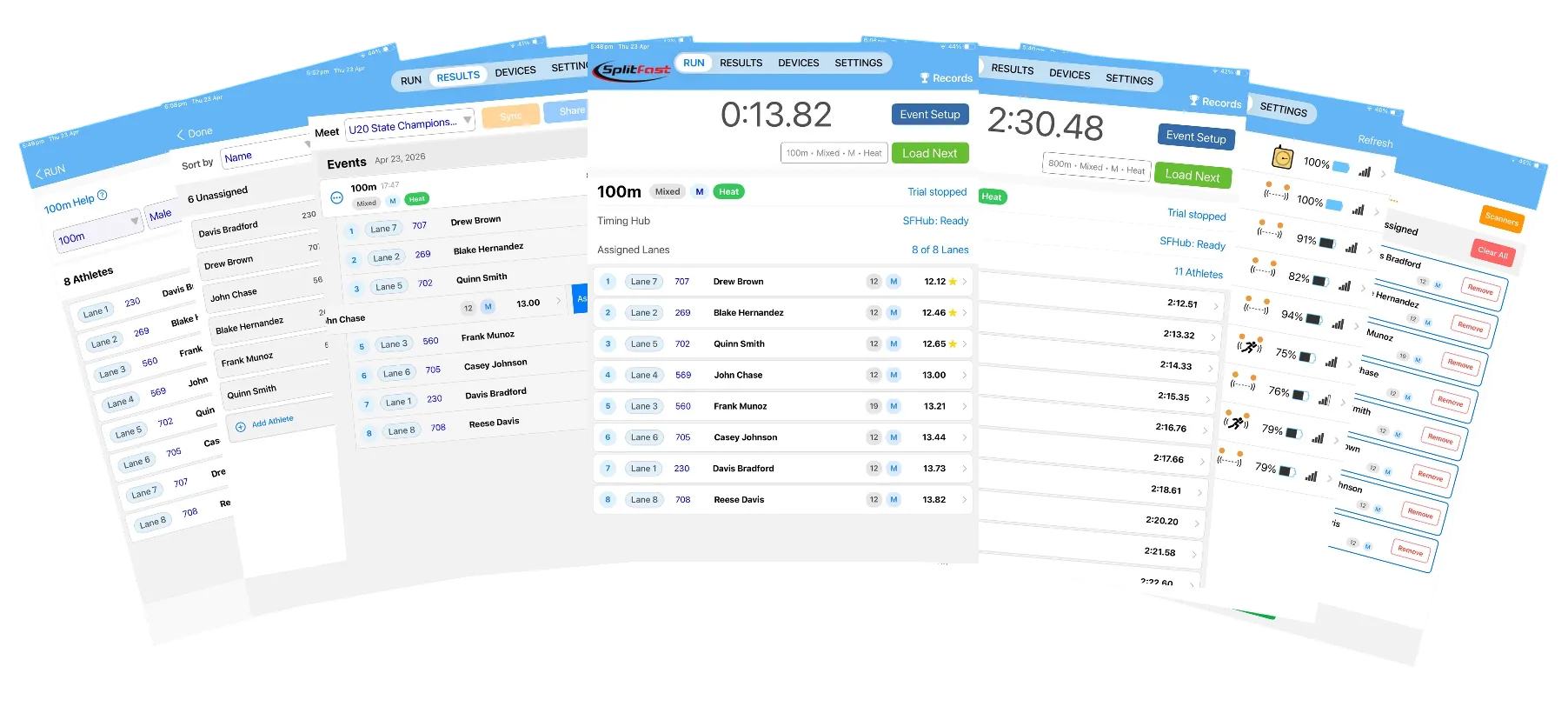
SplitFast Timing App showing five iPad screens including Select Athletes, Results page, 100m Run page with ranked times, 800m group finish, and Devices page with 8 gates connected
Multi-Lane Sprint Timing
Group Finish Distance Racing
Splits and Performance Analysis
Up to 8 Lanes
Results Portal Sync
Flying Start & Shuttle Modes
iPhone & iPad

Every gate, every lane, every battery — visible at a glance

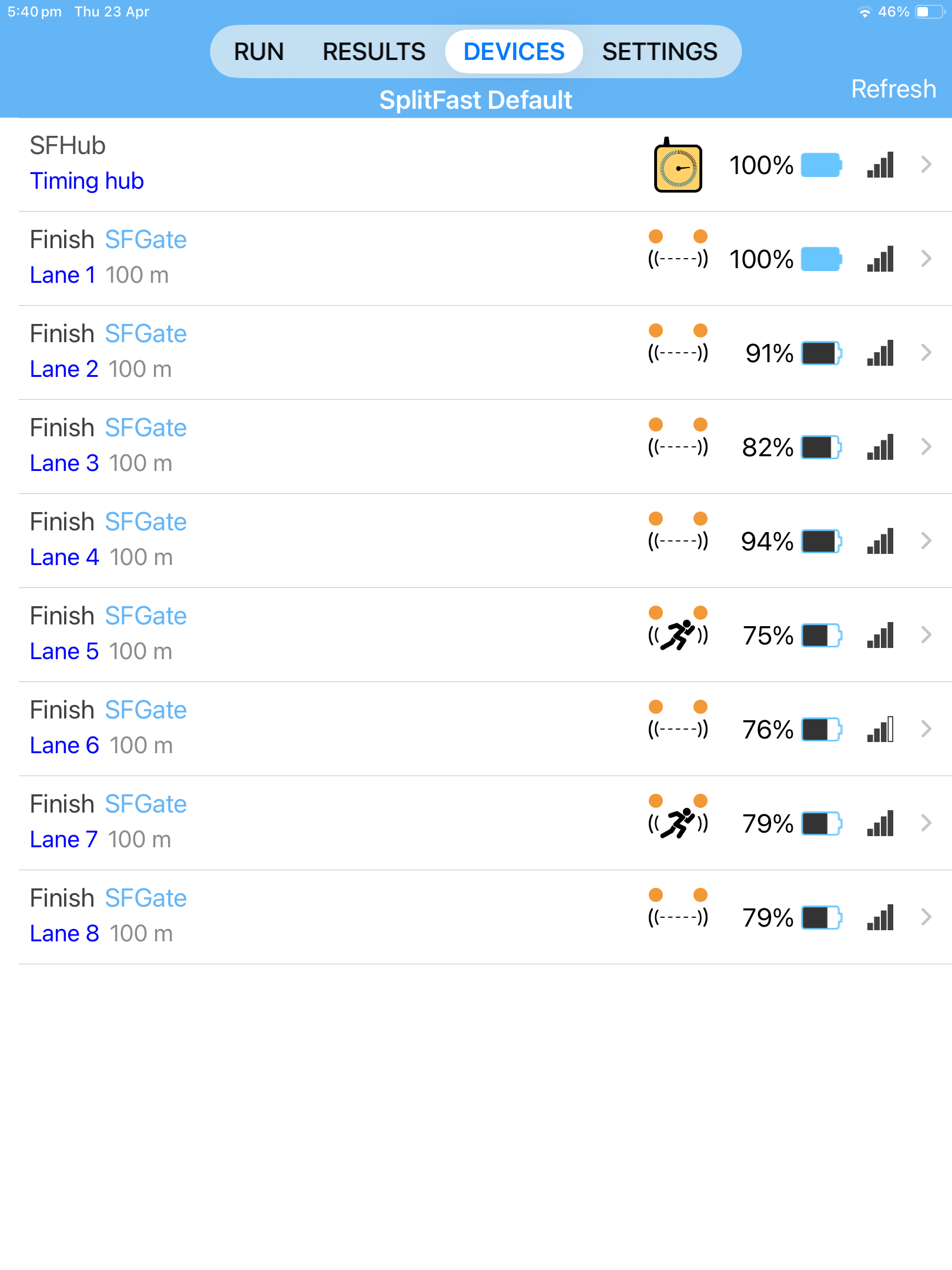
The Devices page shows the complete status of your SplitFast system at a glance. The Timing Hub and every connected LiDAR gate appear in a single list, each showing gate type, lane assignment, distance, battery level, and Radio signal strength. The running athlete icon confirms when a gate is actively detecting.

  • Timing Hub and all gates visible on one screen
  • Battery percentage displayed for every device
  • Radio signal strength shown for every device
  • Running athlete icon confirms active detection in each lane
  • Tap any device to configure gate type, lane, distance, and detection range
  • Supports up to 8 LiDAR gates simultaneously
SplitFast Timing App Devices page showing Timing Hub and 8 SFGate Finish gates for Lanes 1 to 8 with battery percentages and signal strength indicators

Devices — Timing Hub and 8 gates connected, battery and signal confirmed for every lane

Set up any event in seconds

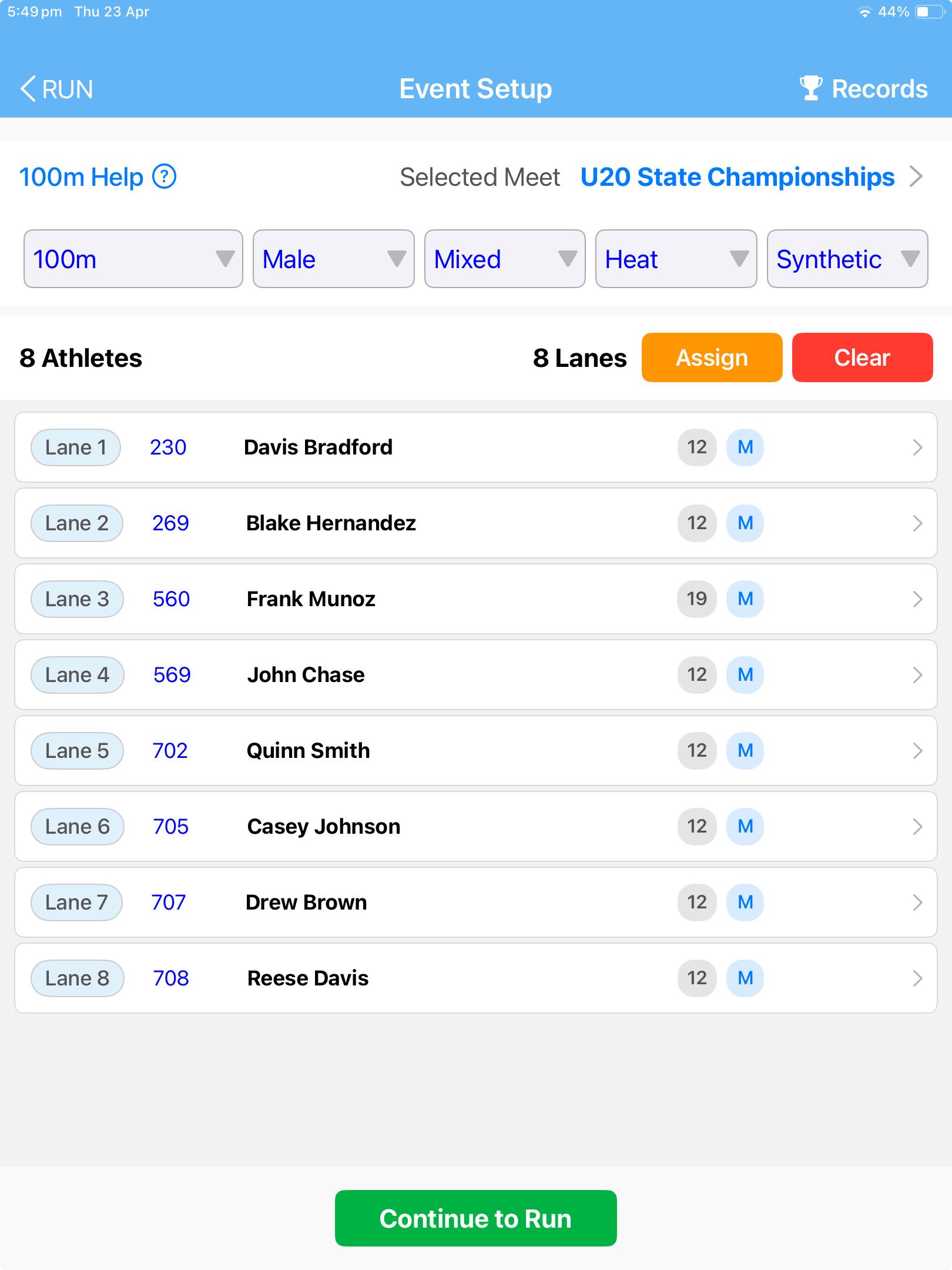
Before each race, select the meet, event distance, gender, age group, and heat type. Athletes pre-loaded from the Results Portal are assigned to lanes with a tap — or drag and drop to rearrange. The app is ready to run the moment the athletes are on the start line.

  • Select meet, event, gender, age group, and heat type from dropdowns
  • Athletes pre-loaded from the Results Portal — no manual data entry
  • Assign athletes to specific lanes with a tap
  • Drag and drop to rearrange lane assignments
  • Add guest athletes on the spot using the search field
  • Barcode scanner supported for fast athlete assignment at large meets
  • Continue to Run button confirms setup is complete
SplitFast Timing App Event Setup page showing 100m Male Mixed Heat for U20 State Championships with 8 athletes assigned to lanes 1 to 8 and Continue to Run button

Event Setup — meet, event, lanes, and athletes confirmed before every race

Smart athlete selection built for carnival day

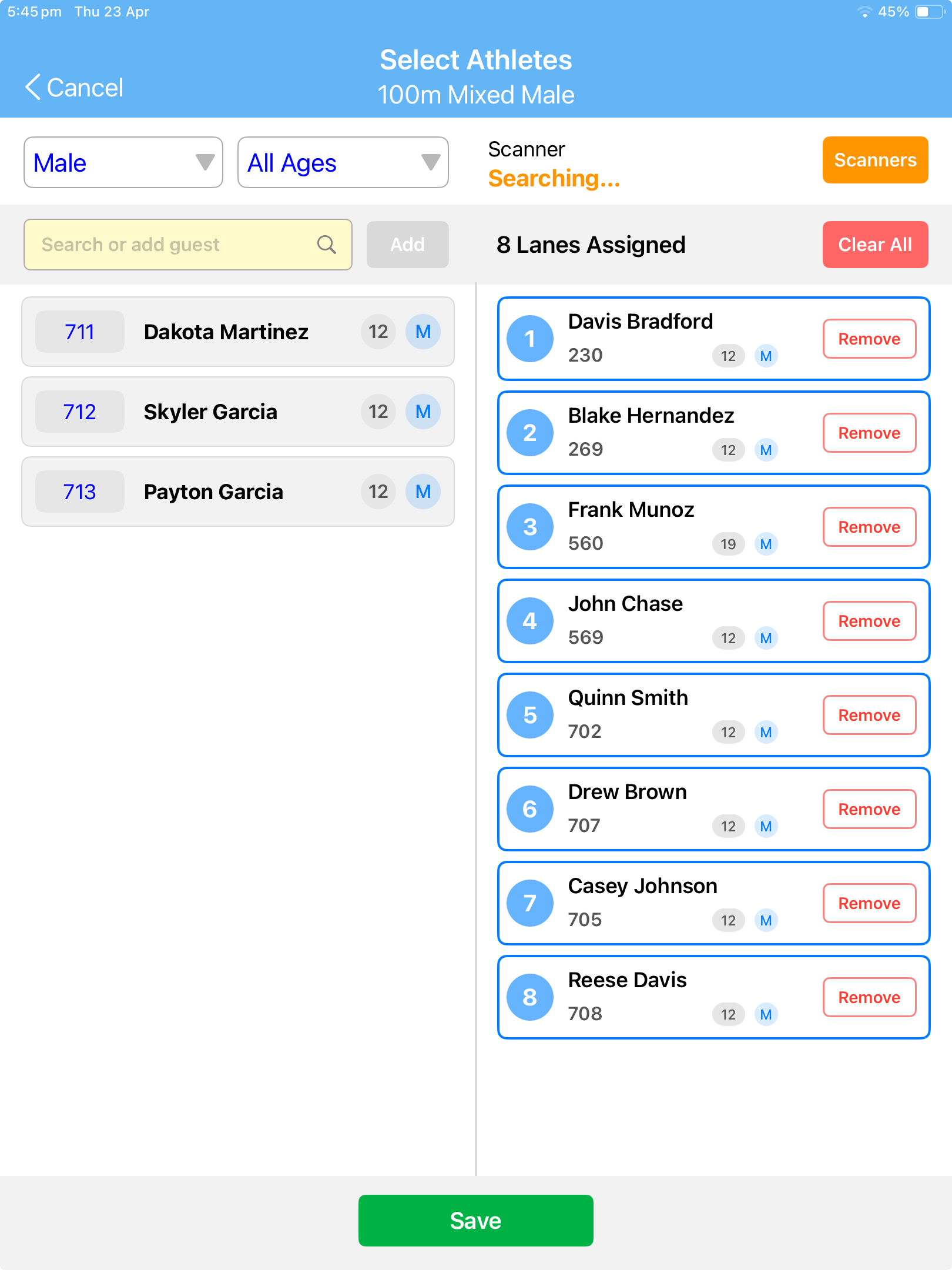
Athletes are drawn from your club's database and filtered automatically by gender and age. Select all athletes competing in the heat with a tap, assign them to lanes, and confirm. Athletes can be added or removed at any point before the race begins.

  • Athletes filtered by gender and age group automatically
  • Remaining unassigned athletes shown on the left
  • Assigned lanes shown on the right with athlete name and ID
  • Remove button to deselect any athlete instantly
  • Search field to find and add guest athletes
  • Barcode scanner integration for rapid lane assignment
  • Save confirms the selection and returns to Event Setup
SplitFast Timing App Select Athletes screen showing split view with unassigned male athletes on left and 8 lanes assigned on right with Remove buttons for 100m Mixed Male

Select Athletes — assigned lanes on the right, remaining athletes on the left, Save to confirm

Eight lanes timed simultaneously, results in an instant

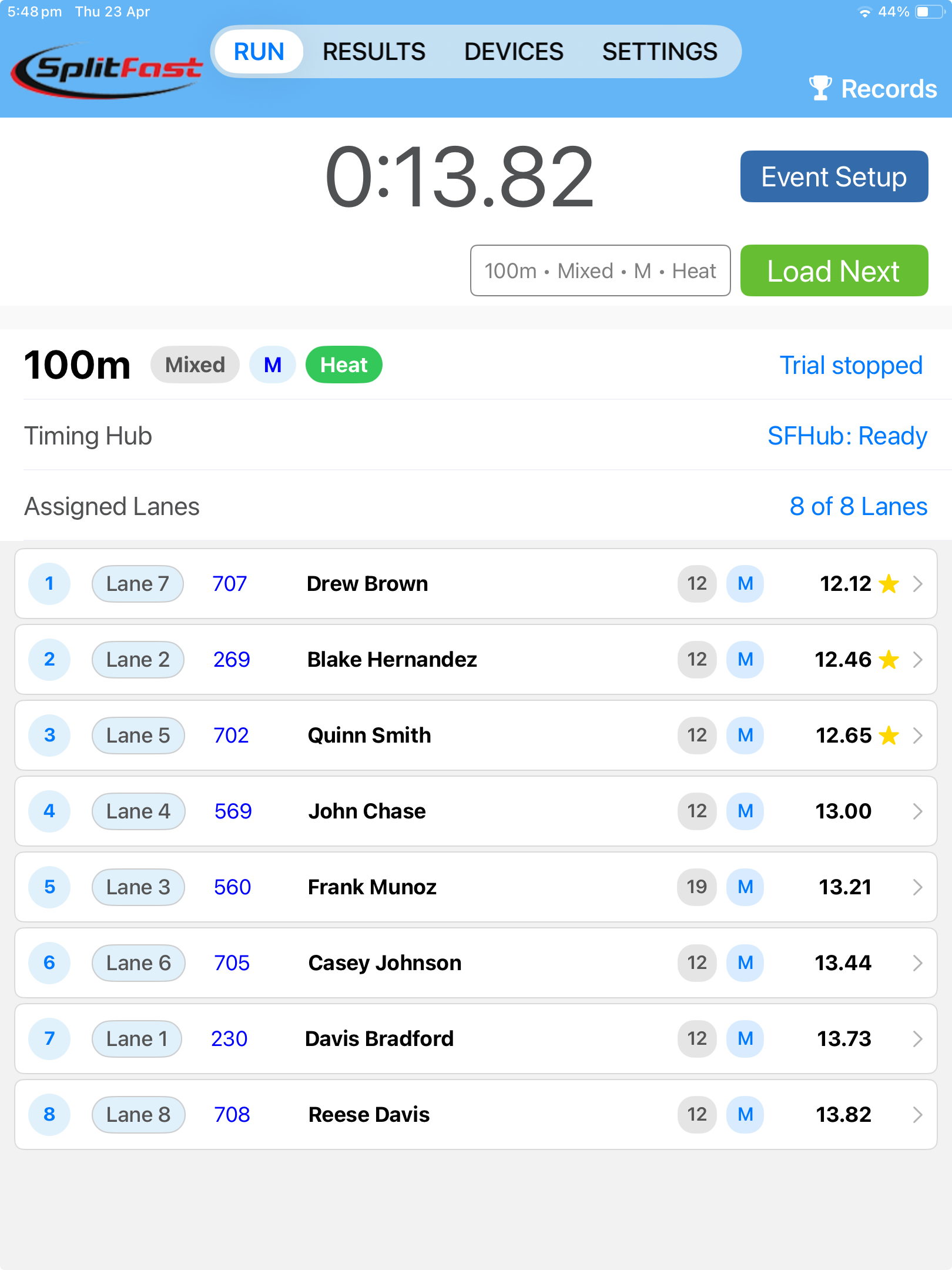
When the starting gun fires, every LiDAR gate detects its athlete independently. As each athlete crosses the finish line, their time is captured by their gate and appears on the Run page immediately — ranked, with lane assignment, athlete name, and personal best flagged in gold. No manual timing, no stopwatches, no errors.

  • Up to 8 athletes timed simultaneously across 8 lanes
  • Results appear on screen the instant each athlete finishes
  • Automatic ranking updated as each athlete crosses the line
  • Personal bests flagged with a gold star
  • Lane number, athlete ID, name, age, and time displayed for every result
  • SFHub Ready status confirmed on screen throughout the race
  • Load Next queues the following heat immediately after results are confirmed
SplitFast Timing App Run page showing completed 100m Mixed Male Heat with 8 athletes ranked 1 to 8 by time, lane assignments, athlete IDs, names and personal best stars

Run page — 8 athletes ranked instantly the moment the last athlete crosses the line

Distance races managed as simply as sprints

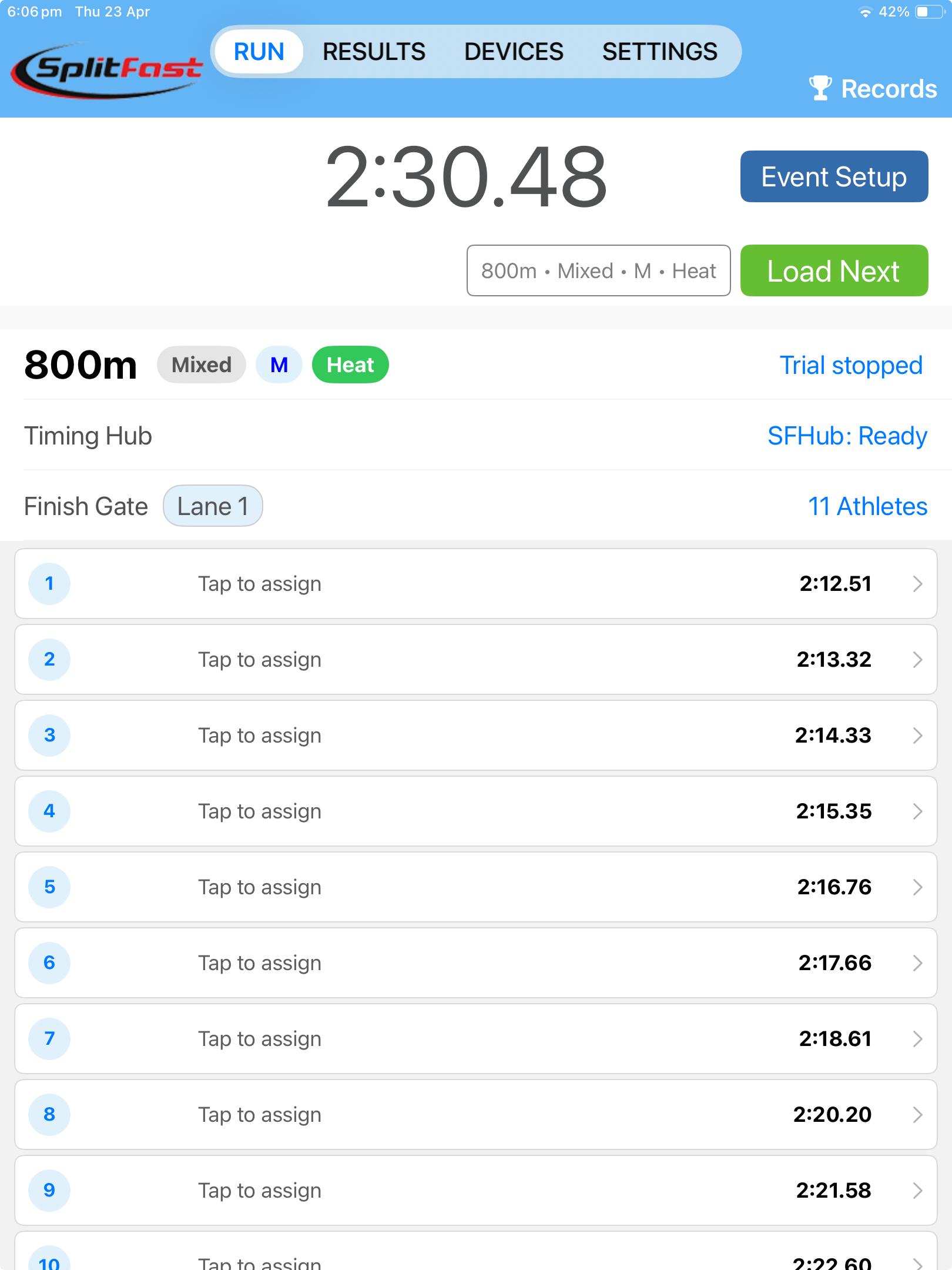
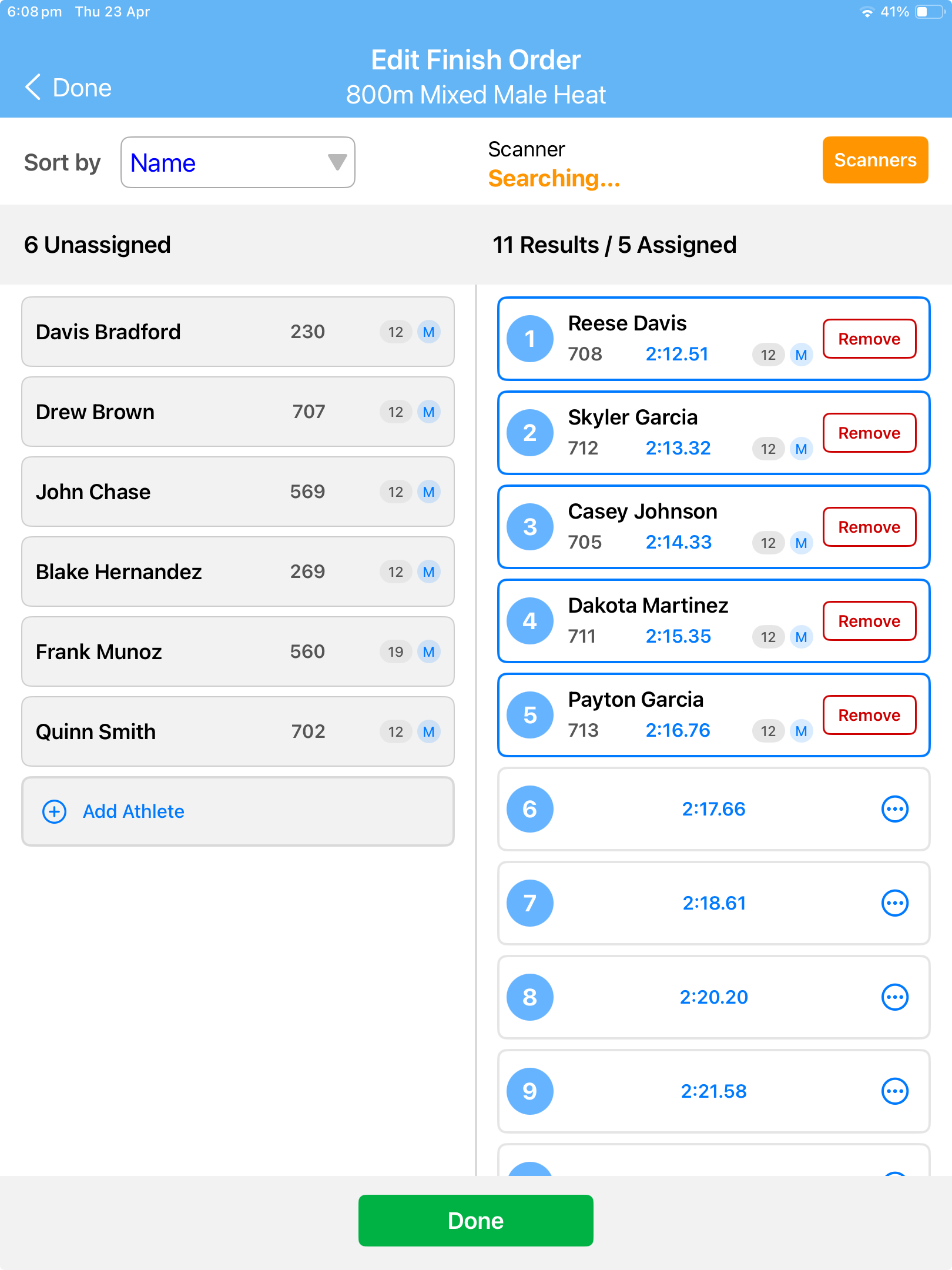
For 800m, 1500m, and longer events where athletes are not confined to lanes, the app records every finish time automatically as athletes cross the line. Times appear in order of finish on the Run page, ready to be assigned to athletes with a tap. A split-screen view shows unassigned athletes on the left and confirmed results on the right.

  • Single LiDAR gate covers multiple lanes for group finish detection
  • All finish times captured automatically as athletes cross the line
  • Times displayed in order of finish immediately after the race
  • Split screen shows unassigned athletes on left, assigned results on right
  • Tap an athlete on the left to assign them to the next unconfirmed time
  • Remove button to correct any assignment error instantly
  • Barcode scanner supported for rapid athlete identification at the finish
SplitFast Timing App Run page showing 800m Mixed Male Heat immediately after the race with 11 Tap to assign rows and finish times from 2 minutes 12 seconds to 2 minutes 22 seconds

Immediately after the race — every finish time captured, ready to assign

SplitFast Timing App Edit Finish Order screen for 800m Mixed Male Heat showing 6 unassigned athletes on left and 11 results with 5 athletes already assigned with times on right

Edit Finish Order — assign athletes to times with a tap, correct errors with Remove

Results reviewed, corrected, and published from one screen

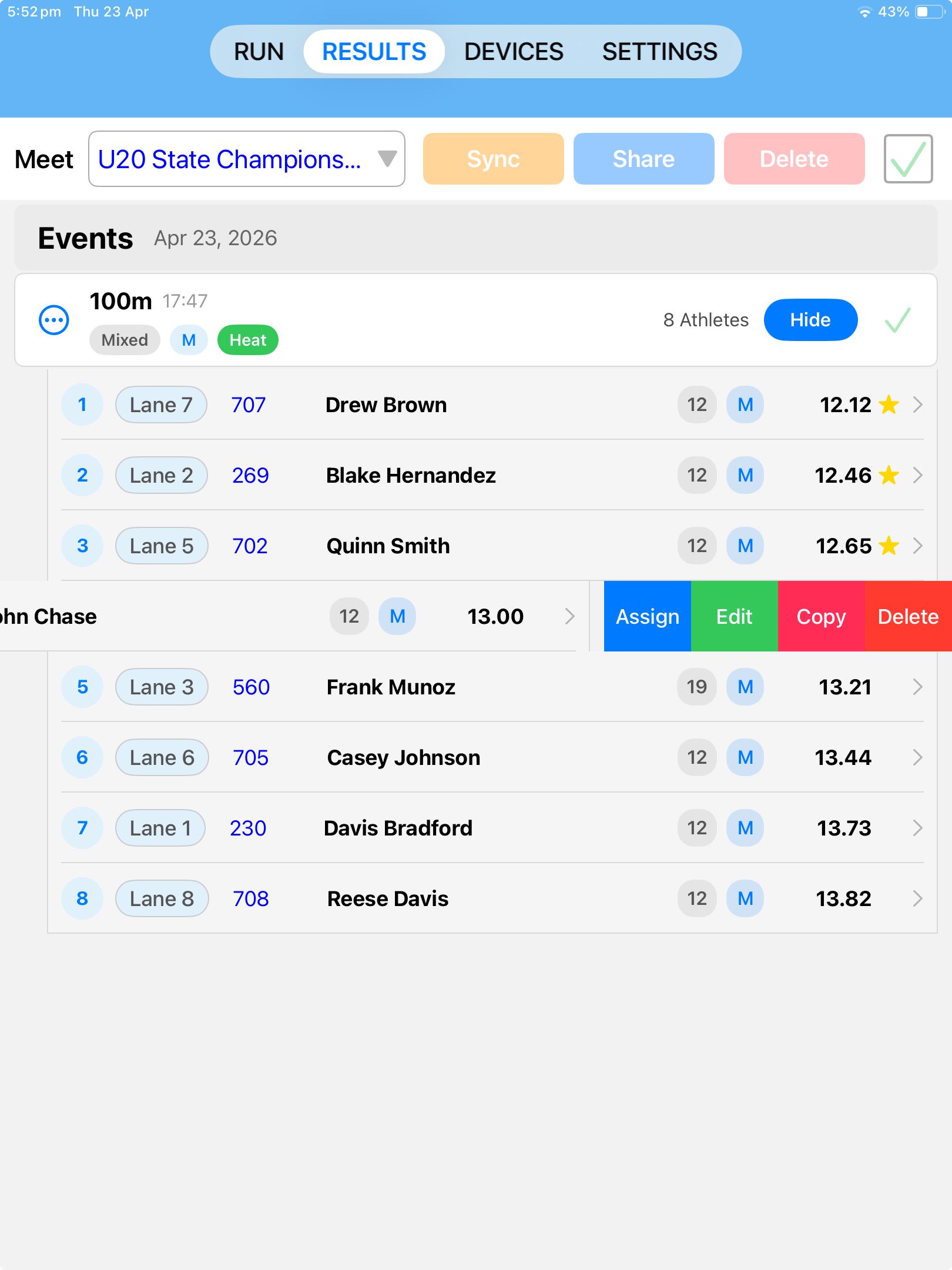
The Results page shows every completed event for the meet, with full rankings, lane assignments, athlete IDs, and times. Swipe any result to access Assign, Edit, Copy, and Delete options. When results are confirmed, tap Sync to publish to the Results Portal and Club Connect app within seconds.

  • All events for the meet listed in one view
  • Full ranked results with lane, athlete ID, name, age, and time
  • Personal bests flagged with a gold star
  • Swipe to access Assign, Edit, Copy, and Delete for any result
  • Sync button publishes results to the Results Portal instantly
  • Share button exports results for external use
  • Results appear in the Club Connect app as soon as they are synced
SplitFast Timing App Results page showing U20 State Championships 100m Mixed Male Heat with 8 athletes ranked by time with lane assignments and personal best stars and Sync Share Delete buttons

Results page — ranked, confirmed, and published to the portal with one tap

From gates on the track to published results in minutes

The SplitFast Timing App follows the same workflow for every event type. Once the system is set up, switching between heats and events takes seconds.

1
Connect your hardware
Power on the Timing Hub and LiDAR gates. They appear on the Devices page with battery and signal status confirmed.
2
Set up the event
Select the meet, event, gender, age group, and heat. Assign athletes to lanes and tap Continue to Run.
3
Start the race
Tap Run. The app issues the starting commands. Each gate records its athlete's time the instant they cross the line.
4
Review results
Results appear ranked on the Run page immediately. Correct any errors, then tap Load Next to queue the following heat.
5
Publish
Go to Results, tap Sync, and results are live on the Results Portal and Club Connect app within seconds.

Built for Training and Performance Analysis

The Timing App supports four training modes to cover every type of session your club runs.

Sprint Training

The primary mode for sprint training and analysis. A starting gun or Motion Sensor triggers the timer. Optional split gates record intermediate times. Used for training sessions and performance analysis.

Flying Start

Measures top speed and speed endurance. The athlete is already moving when they trigger the Start gate. Ideal for maximum velocity testing without the acceleration phase.

Shuttle

A single gate starts and stops the timer as the athlete passes twice. Used for agility testing, change-of-direction drills, and shuttle runs.

Lap

Records a time each time the athlete passes the Lap gate. Used for track lap timing, pacing drills, and endurance sessions. Add split gates to break down each lap into segments.

Optional Motion Sensor — reaction time and false start detection

The SplitFast Motion Sensor is an optional accessory that attaches to the athlete's wrist or starting blocks. It measures reaction time from the starting gun to first movement, detects false starts automatically, and can initiate a trial from the athlete's own movement rather than an audio gun. Reaction time, split times, and finish time are all displayed together on the Results page.

Split times that tell you exactly where athletes win and lose races

Speed is not one thing — it is acceleration, maximum velocity, and speed endurance, and every athlete has a different profile across those three phases. SplitFast's split gate capability lets you measure each phase precisely, so you can see exactly where an athlete gains time on competitors and where they give it back.

With up to 12 LiDAR gates deployed simultaneously, you configure the setup to match the analysis you need — deep split profiling on a single athlete, or simultaneous split timing across a full training group. Every split is captured automatically the instant each athlete crosses a gate. No button presses, no timing errors, no missed data.

Single athlete

1 finish gate and up to 11 split gates

Up to 11 splits and a finish

Complete velocity profiling — measure every phase from reaction and acceleration through maximum velocity to speed endurance across the full race distance.

Two athletes

2 finish gates and up to 10 split gates

5 splits and a finish per athlete

Detailed head-to-head comparison. Identify which athlete leads at each phase and where the gap opens or closes across the race.

Three athletes

3 finish gates and up to 9 split gates

3 splits and a finish per athlete

Small group analysis covering the three key phases — acceleration, maximum velocity, and speed endurance — for each athlete simultaneously.

Four athletes

4 finish gates and up to 8 split gates

2 splits and a finish per athlete

Group training sessions. Capture the acceleration and maximum velocity phases for up to 4 athletes in a single run, with reaction times from the Motion Sensor for each athlete.

Reaction time for every athlete, every run

Add the optional SplitFast Motion Sensor and capture each athlete's reaction time from the starting gun to first movement — automatically, for all athletes simultaneously. Reaction time, split times, and finish time are displayed together in a single result, giving coaches the complete picture of every run.

Download the SplitFast Timing App

Free to download on iPhone and iPad. Requires SplitFast LiDAR timing hardware. Available exclusively on the Apple App Store.

QR code to download the SplitFast Timing App on the Apple App Store

App Store QR